
A Practical Guide for Fiber Internet Providers
In today’s competitive broadband market, delivering a high-quality fiber-to-the-premises (FTTP/FTTH) service means more than just offering fast speeds. It means ensuring every piece of network infrastructure — from OLT in the central office to the Optical Network Terminal (ONT) inside subscriber premises — is installed in a way that maximizes reliability, longevity, and customer satisfaction.
For many service providers, one device that often gets overlooked is the ONT mounting solution. Specifically, the Nokia ONT XS-010X-Q — a compact and high-performance ONT designed for residential and small business use — benefits greatly from being used in conjunction with a purpose-built wall holder. A proper wall-mounted solution isn’t just about tidiness; it contributes to network performance, technician efficiency, and customer experience. Bativ+1
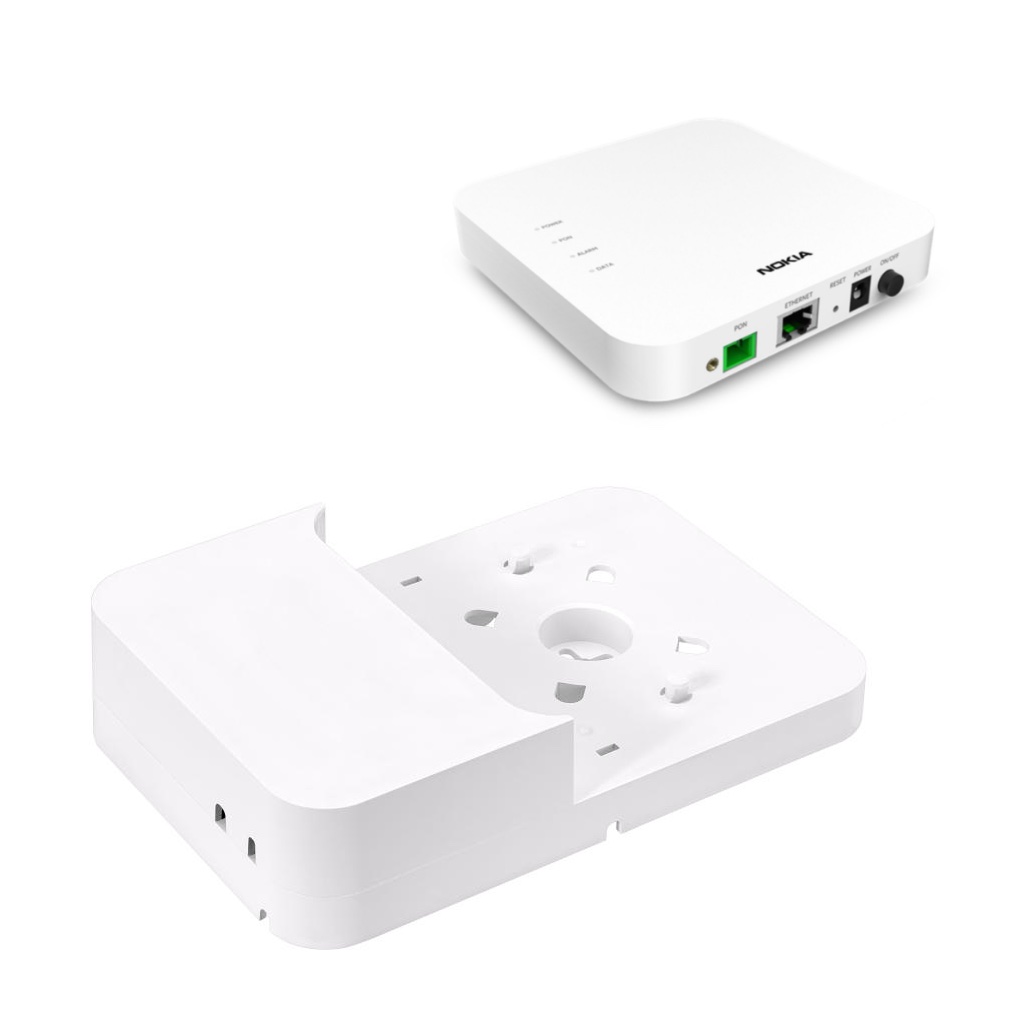
In this post, we’ll walk through how to properly fix your Nokia ONT XS-010X-Q installation using a wall holder, explain why providers should choose this mounting method, describe how to use the product effectively, and guide you on procuring it through Bativ.
Understanding the Nokia ONT XS-010X-Q
The Nokia XS‑010X‑Q XGS‑PON ONT is part of Nokia’s advanced ONT family, designed to meet the demands of next-generation broadband services over XGS-PON with symmetrical 10 Gbps upstream and downstream capabilities. Compact and efficient, it supports high-speed internet, voice, and video traffic for single-family units (SFUs) and small business connections. The device can be used either on a flat surface or mounted on a wall, but a dedicated wall holder significantly enhances its deployment quality. Nokia Corporation | Nokia
In practical terms, the XS-010X-Q is optimized for indoor installations but is sensitive to placement — dangling cables, unstable mounting, or poorly managed fiber slack can compromise connectivity over time and increase support calls.
Why Wall Mounting Matters for ISPs
1. Improved Stability and Protection
Without a mounting solution, ONTs often sit on desks, shelves, or utility spaces where they can be:
- Knocked over during routine activity
- Exposed to tension on fiber or power cables
- Damaged by pets, cleaning, or accidental impacts
Installing the ONT on the wall with a dedicated wall bracket prevents these hazards by securing the device in a fixed, protected position. It reduces the risk of physical faults and signal interruptions caused by stress on the fiber interface.
A purpose-built holder such as the Nokia ONT XS-010G-Q Wall Mount Bracket from Bativ is engineered to fit the device precisely, ensuring it sits securely while maintaining necessary clearances for airflow and cable access. Bativ
2. Professional Aesthetic and Customer Perception
A neat installation reflects positively on your brand. End users often judge service quality based on the installation experience. A wall-mounted ONT looks clean, professional, and thoughtfully integrated into the home or business environment, reinforcing perceptions of reliability and care.
3. Better Cable Management
A wall holder like the Bativ bracket includes integrated cable management features — internal clips and fiber slack storage — that keep both power and fiber cables orderly and strain-free. This organization protects the delicate fiber strands and prevents stress on the ONT ports, which are critical for maintaining signal integrity over time. Bativ
Proper cable handling also makes future maintenance or upgrades easier and more efficient for technicians.
4. Faster and Safer Field Operations
For field technicians executing FTTP rollouts across thousands of premises, efficiency matters. A pre-designed wall holder reduces install time because:
- It requires only basic tools (often just a screwdriver) for mounting.
- No ad-hoc fixes or improvised attachments are needed.
- The ONT snaps or sits into place as soon as the bracket is installed. Bativ
This consistency translates into faster installs, fewer callbacks, and enhanced operational margins.
Choosing the Right Wall Holder: Why Bativ’s Product Stands Out
Bativ supplies a dedicated Nokia ONT XS-010G-Q Wall Mount Bracket designed specifically for the XS-010X-Q and similar models. Although the naming on the supplier site references the closely related XS-010G-Q holder, it is functionally the correct solution for providers seeking a tailored mount for the XS-010 series and comparable ONTs. Bativ
Key reasons providers should choose the Nokia ONT wall holder from Bativ:
- Precision fit — molded to the exact contour of Nokia ONT units for stability and professional appearance. Bativ
- Durable construction — made from flame-resistant PC-ABS material suited for indoor telecom environments. Bativ
- Integrated cable management — provides clips and slack storage for neat fiber and power cable routing. Bativ
- Ease of installation — designed for standard low-voltage wall boxes, usable without specialized tools. Bativ
- OEM-style quality — suitable for high-volume deployments with consistent performance. Bativ
- Wholesale advantages — factory-direct pricing, OEM branding support, bulk packaging, and free samples available upon request. Bativ
How to Install and Use the Wall Holder with Your ONT
Step-by-Step Installation
- Select Mount Location:
Identify a flat, stable wall near the fiber entry point and power outlet. - Mark Mounting Holes:
Position the wall holder at the desired height and use a level to mark where screws will go. - Prepare Wall Anchors (if needed):
Drill pilot holes and insert anchors if mounting on drywall or non-solid surfaces. - Attach the Holder:
Screw the holder only with standard screws provided or equivalents. - Mount the ONT:
Slide or snap the ONT into the holder, making sure it rests securely. - Route Fiber and Power Cables:
Use the holder’s integrated clips to guide cables into place without undue bending or tension. - Test Connectivity:
Once connected, power on the ONT and verify that fiber link and service provision are functioning normally.
A professionally installed ONT reduces the likelihood of service disruptions related to physical movement or cable strain.
How to Buy Your Wall Holder from Bativ
Purchasing the Nokia ONT wall holder through Bativ is straightforward and designed for telecom procurement teams:
- Contact Bativ Sales:
Send an inquiry through the Bativ website or WhatsApp chat option (linked on the product page) with your required quantities and specification needs. Bativ - Request Samples:
Bativ offers free samples for evaluation, allowing technical teams to test the bracket with a sample ONT before placing a large order. Bativ - Bulk and OEM Orders:
You can request factory-direct pricing, OEM branding options, and tailored packaging for large projects. Bativ - Logistics and Delivery:
Bativ’s manufacturing capacity supports high-volume production and global shipping, ensuring that even large FTTP deployment projects receive timely fulfillment. Bativ
Engaging your supply chain early with Bativ allows you to secure competitive pricing and delivery schedules compatible with your deployment deadlines.
Conclusion
For fiber internet providers, delivering high-quality FTTP/FTTH service isn’t just about network speeds — it’s about installation quality, reliability, and customer perception. The Nokia ONT XS-010X-Q is a powerful ONT platform capable of supporting next-generation broadband demands, but its performance and durability are only as strong as its physical deployment.
A dedicated wall mount holder, such as the one offered by Bativ, provides durability, neat cable management, and low-effort installation that reflects a professional service experience. Whether you’re rolling out thousands of connections or upgrading existing installs, choosing the right mounting solution improves network robustness, minimizes support issues, and enhances customer satisfaction.
To equip your field teams and upgrade your deployments, contact Bativ for samples, pricing, and bulk procurement options today — and ensure every Nokia ONT XS-010X-Q in your network is mounted for success.